
EasyHR Knowledge base EasyHR Knowledge base

  • Home
  • Knowledge Base
  • FAQ
  • Contact
Home / Leaves / How to Approve Leave

How to Approve Leave

2324 views Less than a minute 4

To Approve a Leave Request please follow the below steps :

  • Click on Leave Menu.
  • Then click on Leave Approve tab.
  • After that Leaves Request Approval Screen shown. Like below.
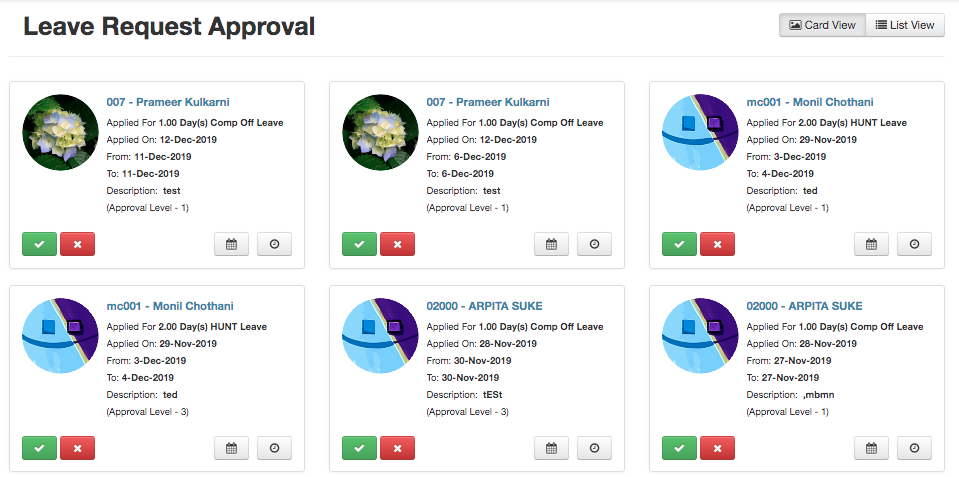
  • All the Leave request which are pending for Approval are shown here.
  • Click on Check Mark to Approve the leave.
  • Click on Cross Mark to Reject the Leave.
ApprovalApproveLeaves Leaves

Related Articles

  • How To Apply For Leave
  • Leaves – Reports
  • Leaves – Encash Approve
  • Leaves – Encash Apply

Categories

  • 10Asset
  • 10Attendance
  • 4Dashboard
  • 27Employee
  • 3Helpdesk
  • 2Import
  • 1Incident
  • 4Induction
  • 4Interview
  • 11Leaves
  • 10Loan
  • 2Login
  • 1Miscellaneous
  • 7On Boarding
  • 9Organization
  • 1Outdoor
  • 1Overtime
  • 5Payroll
  • 6Performance
  • 1Quick Links
  • 5Recruitment
  • 1Report Designer
  • 4Resignation
  • 1Rewards
  • 4Separation
  • 5Survey
  • 2Tasks
  • 5Timesheet
  • 10Training
  • 3Work from Home

Most Viewed

  • Login into Easy HR 82938
  • Login – Change Password 9232
  • Employee – Profile 5420
  • Work from Home – Report 3936
  • Exit Interview – Exit Interview Template 3523

Most Liked

  • Login into Easy HR 89
  • Incident 17
  • Leaves – Apply 16
  • Login – Change Password 13
  • Import – Bulk Upload in Easy HR 8

Social

Article Categories

Asset Attendance Dashboard Employee Helpdesk Import Incident Induction Interview Leaves Loan Login Miscellaneous On Boarding Organization Outdoor Overtime Payroll Performance Quick Links Recruitment Report Designer Resignation Rewards Separation Survey Tasks Timesheet Training Work from Home
Flatbase by NiceThemes © 2026. — Powered by WordPress.