
EasyHR Knowledge base EasyHR Knowledge base

  • Home
  • Knowledge Base
  • FAQ
  • Contact
Home / Performance / Performance – Payout

Performance – Payout

2434 views Less than a minute 4
  • Click on New Payout button to payout a rating for performance.
  • Enter name,rating and achievement in percentage.
  • Enter description and then click on add criteria and save button.
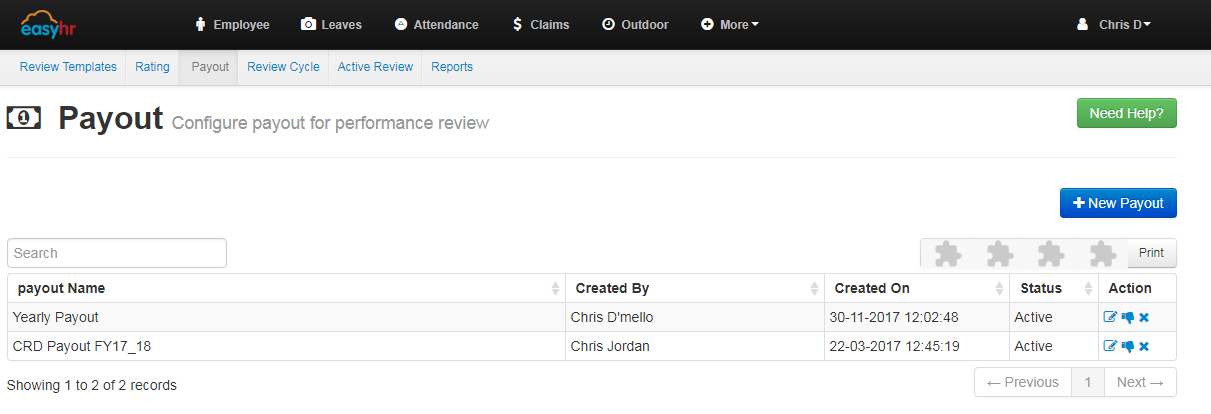
  • Shows over all details,you can edit it by clicking on pencil icon.
  • You can active or inactive the particular task or question by clicking the thumbs up icon, you can also delete it.
PayoutPerformance Performance

Related Articles

  • Performance – Reports
  • Performance – Active Review
  • Performance – Review Cycle
  • Performance – Rating

Categories

  • 10Asset
  • 10Attendance
  • 4Dashboard
  • 27Employee
  • 3Helpdesk
  • 2Import
  • 1Incident
  • 4Induction
  • 4Interview
  • 11Leaves
  • 10Loan
  • 2Login
  • 1Miscellaneous
  • 7On Boarding
  • 9Organization
  • 1Outdoor
  • 1Overtime
  • 5Payroll
  • 6Performance
  • 1Quick Links
  • 5Recruitment
  • 1Report Designer
  • 4Resignation
  • 1Rewards
  • 4Separation
  • 5Survey
  • 2Tasks
  • 5Timesheet
  • 10Training
  • 3Work from Home

Most Viewed

  • Login into Easy HR 83175
  • Login – Change Password 10106
  • Employee – Profile 5507
  • Work from Home – Report 3964
  • Settings /Dashboard /Configuration 3591

Most Liked

  • Login into Easy HR 89
  • Incident 17
  • Leaves – Apply 16
  • Login – Change Password 13
  • Import – Bulk Upload in Easy HR 8

Social

Article Categories

Asset Attendance Dashboard Employee Helpdesk Import Incident Induction Interview Leaves Loan Login Miscellaneous On Boarding Organization Outdoor Overtime Payroll Performance Quick Links Recruitment Report Designer Resignation Rewards Separation Survey Tasks Timesheet Training Work from Home
Flatbase by NiceThemes © 2026. — Powered by WordPress.