
EasyHR Knowledge base EasyHR Knowledge base

  • Home
  • Knowledge Base
  • FAQ
  • Contact
Home / Payroll / Payroll – Process Payroll – Attendance Summary

Payroll – Process Payroll – Attendance Summary

2451 views Less than a minute 4
  • Click on Attendance Summary.

  • To process attendance select the period and status must be unlocked.
  • Now click on process attendance button. In case of missing employee in process attendance, you must have to click on Add missing employee button.
  • Then click on process Attendance button.
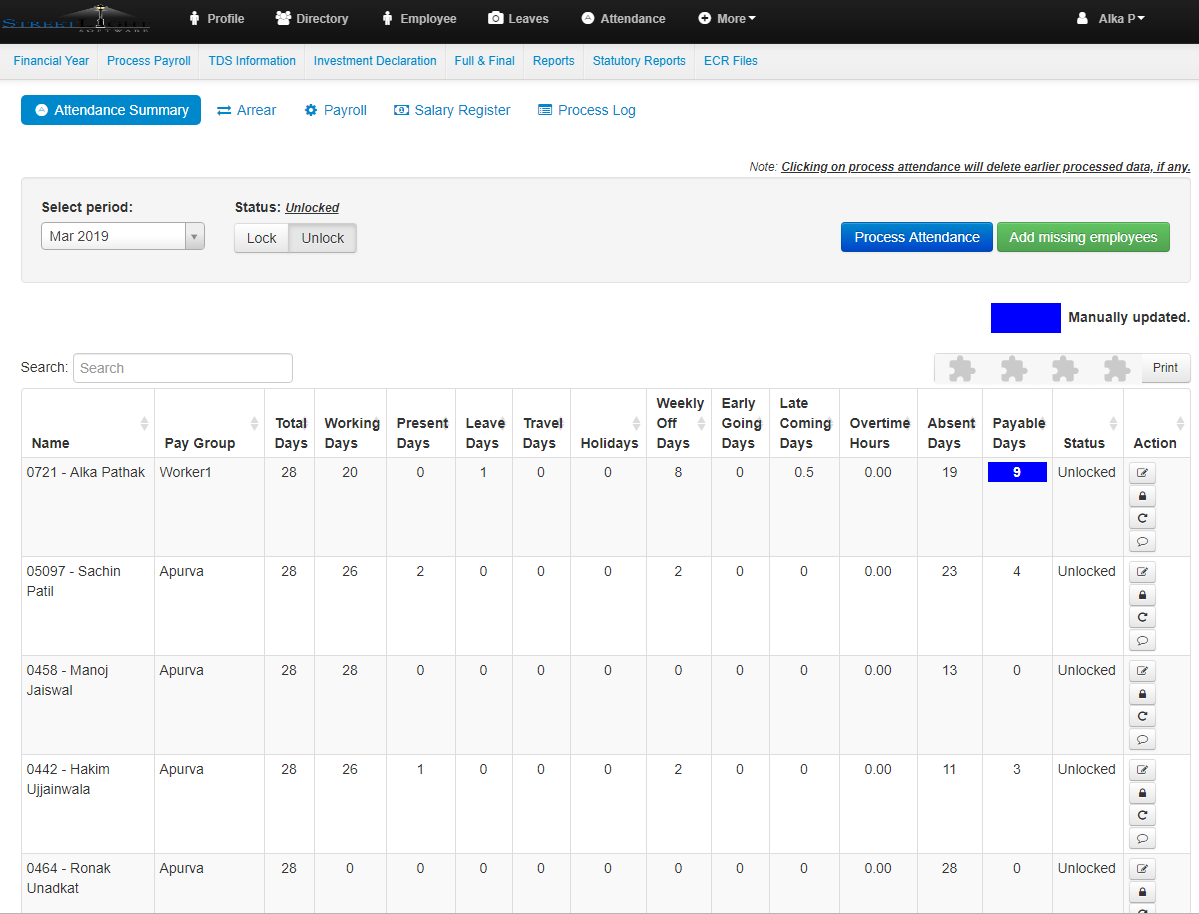
  • To make changes in payable days first must be unlock the attendance summary status.
  • Then select the employee in which you have to make the changes and click the pen icon.
  • Make necessary changes in payable days and click on Save button.
  • The manually updated payable days will be shown in blue colour.
Attendance SummaryPayrollProcess Payroll

Related Articles

  • Import – Variable Pay(Deduction, Earning)
  • How To Process Payroll
  • Process Payroll – Arrear
  • Payroll – Financial Year

Categories

  • 10Asset
  • 10Attendance
  • 4Dashboard
  • 27Employee
  • 3Helpdesk
  • 2Import
  • 1Incident
  • 4Induction
  • 4Interview
  • 11Leaves
  • 10Loan
  • 2Login
  • 1Miscellaneous
  • 7On Boarding
  • 9Organization
  • 1Outdoor
  • 1Overtime
  • 5Payroll
  • 6Performance
  • 1Quick Links
  • 5Recruitment
  • 1Report Designer
  • 4Resignation
  • 1Rewards
  • 4Separation
  • 5Survey
  • 2Tasks
  • 5Timesheet
  • 10Training
  • 3Work from Home

Most Viewed

  • Login into Easy HR 76512
  • Login – Change Password 7882
  • Employee – Profile 4633
  • Work from Home – Report 3383
  • Exit Interview – Exit Interview Template 2783

Most Liked

  • Login into Easy HR 82
  • Incident 17
  • Leaves – Apply 16
  • Login – Change Password 12
  • Induction – Induction Template 8

Social

Article Categories

Asset Attendance Dashboard Employee Helpdesk Import Incident Induction Interview Leaves Loan Login Miscellaneous On Boarding Organization Outdoor Overtime Payroll Performance Quick Links Recruitment Report Designer Resignation Rewards Separation Survey Tasks Timesheet Training Work from Home
Flatbase by NiceThemes © 2025. — Powered by WordPress.